
FitnessSyncer Leaderboards
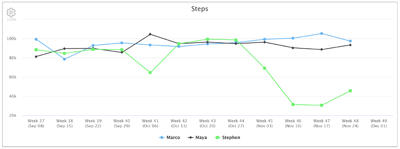
FitnessSyncer Leaderboards is a simple way to have a health and fitness competition between your family, friends, and colleagues. And with FitnessSyncer, you can use whatever device and services you currently use, so it is super easy!
FitnessSyncer Leaderboards show standings, a chart and a table for any data field you choose, such as steps, distance, weight or sleep, so you can see who is leading now and how each period went. The data is based on data gathered from wearables and supported health and fitness services that we support, allowing for great competition between users of Fitbit, Garmin Connect, Google Health Connect, Apple Health, and more. No matter your device, you can participate with ease!
Participation in FitnessSyncer Leaderboards is free. However, to create and organize a FitnessSyncer Leaderboard, a FitnessSyncer Pro membership is required.
Do I need to be a FitnessSyncer Pro subscriber?
The only person who needs to be a FitnessSyncer Pro subscriber is the Leaderboard organizer. All other participants in the Leaderboard do not need a subscription.
How do I create a Leaderboard?
Go to Leaderboards and select Create Leaderboard. The editor has five steps, and you can move between them at any time:
- The competition. Choose whether participants are ranked on one data field, or earn points across several.
- What decides the winner. Choose the data type and the field. You can add other fields to show next to it. For a field that adds up, such as steps or distance, participants are ranked on their total. For a measurement, such as weight or resting heart rate, you choose what to rank on and whether the lowest or the highest value wins.
- Name and schedule. Give the Leaderboard a name. Dates are optional: without them the Leaderboard is ongoing and covers the last 12 weeks.
- The participants. Invite participants by e-mail and optionally group them into teams.
- How it is shown. Choose which views the Leaderboard has (standings, team standings, a trend chart, a table by period) and their order. One is enough, and the first is what participants see first.
Under every step, What participants will be told shows the rule in a sentence, exactly as participants will read it in their invitation.
The fields, the ranking and the points cannot be changed after you save, because each participant agrees to exactly these. To change them, use Clone, which copies the Leaderboard and its participants into a new one. Because of this, we suggest saving with only yourself first and inviting everyone once you are happy with it.
Participants receive an invitation e-mail in your e-mail language, which you can change under your Preferences.
How is the winner decided?
It depends on the kind of data field, and the Leaderboard says which rule it uses at the top.
- A field that adds up (steps, distance, calories, minutes) is ranked on the total for the period, and the highest total wins.
- A measurement (weight, resting heart rate, pace, sleep efficiency) is ranked on the average, the best single measurement, or the change from each participant’s first measurement. The organizer chooses whether the lowest or the highest wins.
- Points are earned for each scored field, and the most points wins.
Participants with equal values share a place. A participant with no data is listed without a place, with the reason, and is never counted as zero.
How do points work?
A points Leaderboard gives each scored field a number of points for a given amount, for example 1 point for every 1,000 steps, 5 points for every hour slept, or 3 points for every minute in heart rate zone 3. The fields can come from different data types, so one Leaderboard can combine activity and sleep.
You can start from a ready-made set (minutes in each heart rate zone, power zone or sleep stage) or build your own list. The organizer can also set a daily limit, which is the most points anyone can earn in one day, so that a single very long workout does not decide the result.
Heart rate and power zones are the zones each participant has set in their own Preferences. A source that reports only daily totals has no minutes in a zone, so it earns no zone points, and the Leaderboard says so next to that participant.
Can we compete in teams?
Yes. In The participants step of the editor, select Compete in teams and enter the team names. You then choose who picks the team (you can assign each participant, or let each participant choose when accepting) and how a team is counted (the average of its members, which is fair when teams are different sizes, or the sum). The Leaderboard then shows team standings as well as individual ones.
What happens when a Leaderboard ends?
A Leaderboard with dates stays open for three days after its end date, so that data which syncs late still counts. After that the result is final and is kept for three months. If e-mail updates are on, participants receive the final result.
Can I opt-out?
Yes, you can remove yourself from the Leaderboard at any time. Visit the Leaderboards page, select the gear on that Leaderboard, and select Leave Leaderboard. In the app, Leave Leaderboard is at the end of each Leaderboard. If you change your mind afterwards, the organizer has to invite you again.
How do I read the Leaderboards page?
Each Leaderboard is a card with its name, its status and the rule that decides the winner. The card opens on the first view the organizer chose, which is usually the standings: your own place, then every participant compared with the leader. The other views, such as the trend chart, are buttons under the card that open and close in place.
The gear on each card holds Download CSV, the e-mail update setting and, for the organizer, Properties.
What services do you support?
FitnessSyncer supports a wide variety of services depending on the type of data for the Leaderboard. To see our supported services, see the FitnessSyncer supported list of apps, trackers, and platforms.
Accessing Leaderboards in FitnessSyncer Apps
To access Leaderboards in FitnessSyncer for iOS and Android:
- Navigate to the Dashboard
- Go to the Options menu
- Select Load Dashboards, then Leaderboard Overview
Your Leaderboards are shown there. With the latest version of the app you can also accept or decline an invitation and leave a Leaderboard, and the app asks you to confirm before you decline or leave. Creating and editing a Leaderboard is done on the website.
Can I share a link with my friends, family, or colleagues to sign up?
Yes, you can! To do so:
- Edit your leaderboard
- In The participants step, enable Allow anyone with the link to join
- Save
- Edit your leaderboard
- From the toolbar, select the (Share) icon
- Select the way which you would like to the link or copy and paste the link
Note that anyone can signup to participate in your leaderboard up to your user allotment. We do not recommend posting the link on public channels.
How do I make a Leaderboard Competition only between a set of dates?
By default, FitnessSyncer Leaderboards are continuous, but you can specify the start and end dates in the Leaderboard configuration by selecting Fixed dates in the Name and schedule step. You may extend the date if your competition continues beyond the original date.
I want to create a few Leaderboards with the same users; how do I best do that?
Start by configuring one FitnessSyncer Leaderboard and get it to your liking. Then use the Clone button for your other fitness and health metrics.
I received an e-mail for a Leaderboard, but when I signed up, it does not recognize the Leaderboard?
Please make sure that you have signed up with the same e-mail address that the e-mail was sent to. If you wish to make a change, please contact the organizer.
If that is the case, it may be that you no longer have access to the Leaderboard. Please contact the Leaderboard organizer or feel free to contact us for assistance.
Is my data safe and secure?
Your privacy is always strictly maintained, and only the exact data requested for the Leaderboards that you accept are shared. Organizers cannot change the type of data without you re-approving your consent.
The Leaderboard organizer will see the same data that you see in the Leaderboard. The organizer is also not permitted to change the type of data without re-creating the Leaderboard and without you re-accepting the new parameters.
In addition to the organizer, all members of the Leaderboard will see the same data which you see when you visit the Leaderboard.
Each user within the Leaderboard will be able to see your Display Name. By default, your Display Name is the first section of your e-mail address, but you can change it under your Profile.
You should only share your metrics with people and organizations you trust.
How is my data identified within a Leaderboard?
Your data is associated with your Display Name. By default, your Display Name is the first section of your e-mail address, but you can change it under your Profile.
How fresh is the data on a Leaderboard?
FitnessSyncer will ensure that your data on the Leaderboard is updated at least once a day. Some services may be more frequent than this, and some services such as Apple Health may require you to use our app to refresh the data manually.
The data shown on the Leaderboard is up-to-date as to when it was loaded.
Are there any data types not recommended for Leaderboards?
We do not recommend that you create or join Leaderboards with actual personal information that includes your weight and similar data. The list is as follows: Blood Pressure, Body Composition, Glucose, Oxygen, and Temperature.
While you may wish to create one with your closest family, we will warn you when you attempt to join such a Leaderboard.
Alternatively, you can run such a Leaderboard with actual values hidden. Rank by the change from the first measurement, and participants see only the change, never the value itself. Hiding is always on for these data types, and the invitation tells each participant exactly what the others will see. It cannot be changed without creating a new Leaderboard and asking everyone again.
Are there any data types not available for Leaderboards?
ECG and Cycle Tracking data cannot be used for a FitnessSyncer Leaderboard as there is no meaningful competition that we believe is relevant.
I suspect a member of the Leaderboard is cheating.
We do not police the data within the Leaderboard.
How are duplicates handled?
If you have multiple records, FitnessSyncer will automatically remove duplicate records and select the sample with the richest dataset.
I used to have access to a Leaderboard, but I do not anymore?
The usual cause of this is one of the following:
- The organizer has deleted the Leaderboard
- The organizer has revoked your access to the Leaderboard
- The organizer is no longer a FitnessSyncer Pro subscriber
- The organizer has deleted their account
- You have removed yourself from the Leaderboard
The best way to resolve this is to contact the organizer.
Can I create a challenge towards a common goal?
If you are trying to create a challenge so that your entire team reach a common goal of say 5,000,000 Steps in a month, FitnessSyncer Leaderboards can help!
Choose a field that adds up, such as steps or distance, then select “Set a team goal that everyone works toward together” and enter the goal value. A team goal is not offered for a measurement such as weight, because those values do not add up.
The Leaderboard then shows how much of the goal is done, compared with how much of the time has gone, and each participant’s contribution. The trend chart becomes a stacked column chart with a goal line, and each period carries everything up to and including it.
Looking for more options or a different representation? Please contact us.
Can I create a challenge for the person with the most weight loss?
Yes, you can easily create a challenge for the person with the most weight loss or similar metrics.
When creating the Leaderboard, choose Weight as the field and rank by Percent change from the first measurement, and choose The lowest value wins. Percent change is fair across different starting weights. Actual weights are never shown to anyone; participants see only the change.
We suggest setting dates for such a Leaderboard, so that the first measurement stays the same throughout. This cannot be changed without creating a new Leaderboard.
How do I transfer a FitnessSyncer Leaderboard to another user?
Please contact us, and we can make the change.
Is there a limit to the number of users for FitnessSyncer Leaderboards?
A Leaderboard holds up to 20 participants. Larger Leaderboards are available on an Enterprise license, priced for each participant. Please contact us to arrange one.
I have a lot of users; how can I upload them?
The easiest way to upload a lot of users to FitnessSyncer Leaderboards is to simply copy and paste your list into the e-mail address list. We understand space, newline, and comma delimited data. To put each person on a team at the same time, paste one person on each line as the e-mail address, a comma and the team name, which is what two columns copied from a spreadsheet look like once saved as CSV. A team name that is new is added to your team names. If you need assistance, please contact us.
How do Power Zone and Heart Rate Zone Leaderboards work?
The Power Zone and Heart Rate Zone Leaderboards are based on each individual user’s configuration, so please make sure your participants are configuring these appropriately in your Preferences.

